Advanced Features
YAICLI includes several advanced features to enhance your interaction with AI models.
Chat Persistent Sessions
YAICLI allows you to save and manage chat sessions:
# Start a temporary chat session
$ ai --chat

# Start a persistent chat session with a title
$ ai --chat "Python programming help"

# List saved chat sessions
$ ai --list-chats
Managing Chat Sessions
In a chat session, you can use these commands:
- /save <title> - Save the current session with a title
- /list - List all saved sessions
- /load <index> - Load a previously saved session
- /del <index> - Delete a saved session
Persisting Chat Sessions
When you start a chat with a title, the session is automatically saved to disk:
$ ai --chat "check disk usage"
Chat title: check disk usage
The session will be persisted to CHAT_HISTORY_DIR by default.
Role Management
YAICLI supports custom roles to guide AI behavior:
# Create a new role
ai --create-role "Python Expert"

# List all roles
ai --list-roles

# Show a role
ai --show-role "Python Expert"

# Delete a role
ai --delete-role "Python Expert"

# Use a specific role
ai --role "Python Expert" "How do I use decorators?"
Function Calling
YAICLI supports function calling, enabling AI models to call functions to accomplish tasks:
# Install default functions
ai --install-functions

# List available functions
ai --list-functions

# Enable function calling in queries
ai 'check the current dir total size' --enable-functions
You can also define custom functions by adding them to ~/.config/yaicli/functions/.
Tool Execution Confirmation
By default YAICLI asks for confirmation before running each tool call:
╭─ Confirm tool call ─────────────────────────────────────╮
│ execute_shell_command({"shell_command": "du -sh ."})    │
╰─────────────────────────────────────────────────────────╯
Execute tool? [y]once, [a]session, [A]always, [n]o:
| Key | Meaning |
|---|---|
y |
Allow this call only |
a |
Allow for the rest of this session |
A |
Always allow — saved to ~/.config/yaicli/tool_permissions.json |
n |
Deny — the model receives a refusal result and can adapt |
Pressing Ctrl-C or sending EOF at the prompt is treated as a denial.
In non-interactive sessions (piped stdin / no TTY), tools already in the persistent allowlist run automatically; all others are denied with a hint.
To disable confirmation and restore silent execution:
# config.ini
TOOL_CONFIRM=false
or:
export YAI_TOOL_CONFIRM=false
MCP (Machine Comprehension Protocol)
MCP allows AI models to use external tools:
# Enable MCP in queries
ai 'What is the latest exchange rate between BTC and USD?' --enable-mcp
Configure MCP tools in ~/.config/yaicli/mcp.json.
Image Input (Vision)
YAICLI supports sending images to vision-capable models (GPT-5.2, Claude 3, Gemini, Llama 3.2 Vision, etc.) using the --image / -i option.
Local Images
Pass a local image file path. The image will be validated and base64-encoded before sending:
ai --image photo.jpg "What is in this image?"
ai -i screenshot.png "Describe the UI layout"
Supported formats: JPEG (.jpg, .jpeg), PNG (.png), GIF (.gif), WebP (.webp).
URL Images
Pass an image URL to send it directly to the provider:
ai --image https://example.com/diagram.png "Explain this architecture"
Multiple Images
Use -i multiple times to send multiple images in one request:
ai -i before.png -i after.png "What changed between these two screenshots?"
Image-Only Invocation
You can send an image without a text prompt:
ai --image photo.jpg
Provider Compatibility
Image input is automatically formatted for each provider family:
| Provider Family | Providers | Image Format |
|---|---|---|
| OpenAI-compatible | OpenAI, DeepSeek, Groq, Mistral, OpenRouter, etc. (~25) | content array with image_url blocks |
| Anthropic | Anthropic, Anthropic Bedrock, Anthropic Vertex | content array with image + source blocks |
| Gemini | Gemini, Vertex AI | Part.from_bytes() / Part.from_uri() |
| Ollama | Ollama | Separate images array (base64 only) |
Providers without vision support (Cohere, HuggingFace, ChatGLM, ModelScope) will show a warning and send text-only messages.
Limitations
- Image input is supported in single-shot mode only, not in interactive
--chatmode - No client-side file size limit; the provider API enforces its own limits
- Ollama may not support URL images; use local files instead
- No automatic image resizing or optimization
Custom Configuration
LLM Provider Configuration
YAICLI works with many LLM providers. Configure your preferred provider in the config file:
[core]
PROVIDER=openai  # or cohere, gemini, ollama, etc.
BASE_URL=        # leave empty for default provider URL
API_KEY=your_api_key_here
MODEL=gpt-5.2
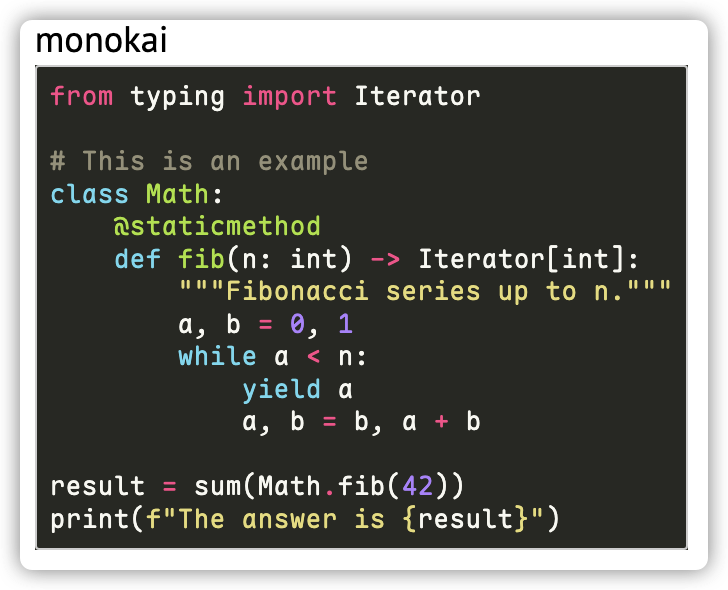
Syntax Highlighting Themes
Change the code highlighting theme:
CODE_THEME = monokai
Browse available themes at: https://pygments.org/styles/
Extra Headers and Body Parameters
Add custom parameters to API requests:
EXTRA_HEADERS={"X-Extra-Header": "value"}
EXTRA_BODY={"extra_key": "extra_value"}
Example for Qwen3's thinking behavior:
EXTRA_BODY={"enable_thinking": false}
# Or limit thinking tokens:
EXTRA_BODY={"thinking_budget": 4096}